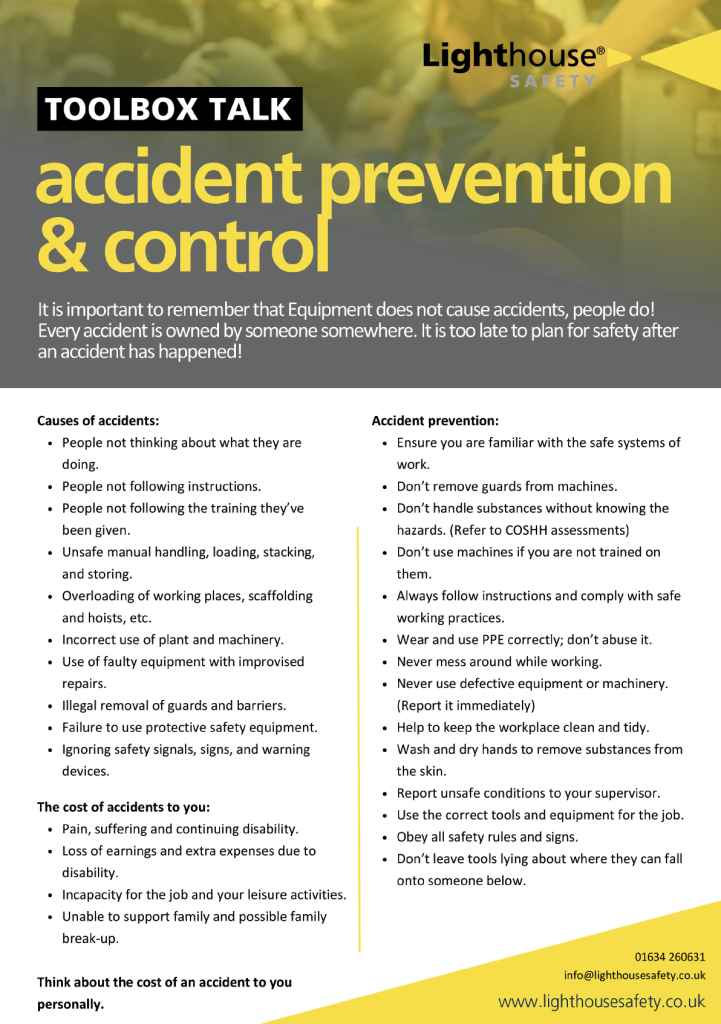
Too many safety meetings feel like a box-ticking exercise. Workers file in, someone reads a generic script, everyone signs a sheet, and the team disperses. No discussion. No relevance. No real impact.
The problem isn’t the intent — it’s the execution. Without structure, customization, and active engagement, toolbox talks become invisible rituals.
The solution? An editable toolbox talk template that’s flexible, professional, and easy to adapt — not just for compliance, but for actual risk mitigation.
A well-designed template saves time, ensures consistency, and keeps conversations focused on real hazards. More importantly, it allows supervisors to tailor content to specific crews, locations, and tasks — turning a routine meeting into a meaningful safety intervention.
What Is an Editable Toolbox Talk Template?
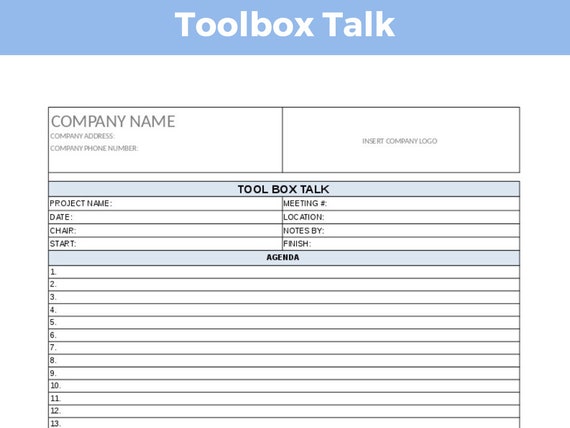
An editable toolbox talk template is a pre-formatted document that outlines the essential components of a safety meeting, designed to be customized before delivery. It typically includes:
- Meeting date, time, and location
- Topic and hazard focus
- Attendee list with signatures
- Key discussion points
- Action items or follow-ups
Unlike static PDFs or printed handouts, editable means the file can be modified using common software — like Microsoft Word, Google Docs, or specialized EHS platforms. This allows:
- Quick updates for site-specific risks
- Language adjustments for multilingual crews
- Branding consistency across teams
- Integration with digital safety systems
The template isn’t the script — it’s the framework that ensures nothing critical is missed, while leaving room for real-time dialogue.
Real-World Use Case A construction foreman prepares for a roof work session. Instead of rewriting a full talk from scratch, he opens his editable template, updates the hazard section with "fall protection near unguarded edges," adds photos of the actual worksite, and checks off PPE requirements. The meeting takes 12 minutes, references real conditions, and generates actionable reminders.
Core Sections Every Editable Template Must Include
A strong template balances structure with flexibility. Here are the non-negotiable sections:
1. Meeting Header
- Project name and site address
- Date, start time, duration
- Facilitator name and role
This establishes context and supports audit trails.
2. Safety Topic & Hazard Focus A clear, one-line description:
“Fall Protection: Working at Heights on Steel Framing”
Avoid vague topics like “General Safety.” Specificity drives relevance.
3. Discussion Points Break the topic into 3–5 actionable segments. For fall protection: - Identify fall hazards in today’s work area - Verify 100% tie-off compliance - Inspect harnesses and lanyards before use - Confirm rescue plan is in place
Use bullet points — not paragraphs — to keep it scannable.
4. Attendee Sign-In Sheet Digital or printed,
this verifies participation. Include:
- Name
- Role
- Signature
- Optional: employee ID or crew number

Pro Tip: Use QR code sign-in apps for paperless tracking — but only if your editable template supports integration.
5. Action Items & Follow-Up Document decisions made:
- “All leads to inspect harnesses weekly”
- “Install temporary guardrails by 10 a.m. tomorrow”
Assign owners and deadlines. This turns discussion into accountability.
Common Mistakes That Undermine Effectiveness
Even with a great template, poor execution kills impact. Watch for these pitfalls:
Mistake 1: Copy-Pasting Without Customization
Using the same “electrical safety” slide deck for a welding crew and a concrete pour team ignores real differences in exposure.
Fix: Edit the hazard examples to match the day’s work. Show real photos. Name actual equipment.
Mistake 2: One-Way Delivery Reading from a script while workers stare at their boots doesn’t count as a “talk.”
Fix: Build in questions. “What would you do if you saw a frayed extension cord?” forces engagement.
Mistake 3: Ignoring Language Barriers If 40% of your crew speaks Spanish, an English-only template fails.
Fix: Use bilingual templates or add translated headers. Better yet — deliver the talk in the crew’s preferred language.
Mistake 4: No Follow-Through No record of action items = no accountability.
Fix: Design your template with a “Responsible Party” and “Due Date” column in the follow-up section.
Top 5 Editable Toolbox Talk Template Options
Not all templates are created equal. Here’s a comparison of reliable, field-tested tools:
| Tool | Format | Key Features | Best For |
|---|---|---|---|
| SafetyWise Template Pack | Word/PDF | OSHA-aligned, 50+ topics, bilingual support | General contractors needing variety |
| ClickSafety Editable Kit | Word/Google Docs | Cloud sync, image upload, signature fields | Teams using digital workflows |
| EHS Insight Template Library | Integrated platform | Auto-scheduling, analytics, mobile access | Enterprise safety departments |
| OSHA.gov Sample Templates | PDF/Word | Free, government-reviewed, minimal design | Budget-conscious small crews |
| SafetyTek Custom Builder | Online editor | Drag-and-drop customization, branding options | Companies wanting branded materials |
Recommendation: Start with OSHA’s free templates if you’re new. Scale to ClickSafety or EHS Insight when digitizing records.
How to Customize Your Template for Maximum Impact
A blank template is useless without proper tailoring. Follow this workflow:
Step 1: Pick the Daily Hazard Base it on:
- The task being performed
- Weather or environmental conditions
- Recent near-misses or incidents
Example: After a heavy rain, shift from “ladder safety” to “slip hazards on wet decking.”
Step 2: Insert Site-Specific Details Add:
- Photos of the actual work zone
- Names of affected equipment (e.g., “Crawler crane #7”)
- Reference to permit numbers or JSA IDs
Step 3: Adapt Language and Tone For experienced crews, skip basics. Focus on edge cases: > “You all know fall arrest — but what’s your backup if anchor points fail?”
For new hires, include definitions and PPE checks.
Step 4: Enable Feedback Add a line:
“Team input: What’s one safety concern you have today?”
Document responses in the margin. Shows leadership listens.
Integrating Templates Into Your Safety Workflow
A standalone document won’t change culture. It must be part of a system.
Daily Routine
- Morning Prep: Supervisor selects topic, edits template, prints or loads to tablet
- Meeting: 10–15 minutes, interactive, sign-in completed
- Post-Meeting: File signed copy in project binder or upload to cloud
- Weekly Review: Safety manager scans logs for recurring issues
Digital vs. Paper
- Paper: Works offline, simple, but hard to search or analyze
- Digital: Enables data tracking, but requires devices and training
Hybrid Option: Use tablets with PDF editors (like Adobe Fill & Sign) — gives editability without full platform commitment.
Audit-Ready Documentation In an OSHA inspection, you’ll need proof:
- That talks occurred
- That content matched site conditions
- That employees participated
An editable template with dated, signed, and customized records satisfies all three.
Final Tips for Sustained Success
An editable toolbox talk template is only as good as how you use it. Keep these principles in mind:
- Update quarterly: Review and refresh templates to reflect new risks or equipment
- Train supervisors: Don’t assume they know how to lead a talk — teach facilitation skills
- Rotate topics: Follow a 90-day cycle to cover all core hazards
- Involve crews: Let workers suggest topics — increases ownership
- Measure impact: Track if incidents drop after targeted talks
Make Safety Conversations Consistent — Without Sacrificing Relevance
An editable toolbox talk template isn’t about saving time — it’s about making every minute count. It removes the guesswork, ensures compliance, and creates a repeatable standard for safety communication.
But the real power comes from customization. When workers see their names, their tools, and their risks reflected in the discussion, they stop tuning out.
Start with a proven template. Adapt it daily. Follow up on actions. Repeat.
That’s how safety becomes a habit — not a formality.
FAQ What should be included in a toolbox talk template? Date, location, topic, discussion points, attendee list with signatures, and action items.
Can I use Google Docs for an editable toolbox talk template? Yes — Google Docs allows real-time editing, sharing, and version control, making it ideal for teams.
How often should toolbox talks be held? At minimum, weekly — but daily for high-risk tasks or new crews.
Are digital signatures valid on toolbox talk forms? Yes, if your system complies with electronic record standards (like 29 CFR 1910.9).
Should toolbox talks always be documented? Yes — documentation proves compliance and helps track recurring safety issues.
Can one template work for all job sites? Only as a base. Each site requires customization for local hazards, equipment, and crew.
How long should a toolbox talk last? Between 10 and 15 minutes — long enough to be meaningful, short enough to hold attention.
FAQ
What should you look for in Editable Toolbox Talk Template for Safer Work Sites? Focus on relevance, practical value, and how well the solution matches real user intent.
Is Editable Toolbox Talk Template for Safer Work Sites suitable for beginners? That depends on the workflow, but a clear step-by-step approach usually makes it easier to start.
How do you compare options around Editable Toolbox Talk Template for Safer Work Sites? Compare features, trust signals, limitations, pricing, and ease of implementation.
What mistakes should you avoid? Avoid generic choices, weak validation, and decisions based only on marketing claims.
What is the next best step? Shortlist the most relevant options, validate them quickly, and refine from real-world results.